A Practical Guide to Automated Testing DevOps
Discover how automated testing DevOps transforms your CI/CD pipeline. This guide covers practical strategies, tools, and AI's role in accelerating releases.
Discover what automated regression testing is and how to implement it. Learn key strategies for CI/CD, test selection, and measuring real business impact.
Automate and scale manual testing with AI ->
So, what exactly is automated regression testing?
Think of it as a crucial safety net for your software. Every time your developers make a change—whether it’s adding a new feature, fixing a bug, or just tidying up the code—this process automatically re-runs a suite of existing tests. The goal is simple: make sure the new code didn’t accidentally break something that was already working perfectly.
It catches those sneaky, unintended side effects, known as regressions, before they ever reach your users.

Picture your application as a complex machine with countless interconnected gears. When you add a new gear or adjust an existing one, you risk throwing the whole system out of sync. Automated regression testing is the quality control system that methodically checks the entire machine after every single tweak, ensuring it still runs smoothly.
Without it, you fall victim to “software decay,” where the quality of your product slowly degrades with each update. The core mission of automated regression testing is to catch bugs early, automatically, and consistently.
Let’s be honest: without automation, regression testing is a nightmare. It’s a manual, repetitive, and soul-crushing task for QA teams. Imagine having to click through every single feature of your application after every minor code push. It’s simply not scalable.
This manual grind creates massive bottlenecks, which inevitably leads to:
Automated regression testing cuts right through these problems. It can execute thousands of tests in minutes, not days, giving your team the rapid feedback they need to move fast without breaking things. For a deeper dive, check out this in-depth guide on regression testing automation.
The ROI of Automation: Investing in automation isn’t just about tech—it’s a smart business decision. By catching issues before they impact customers, you protect revenue, keep users happy, and let your engineers focus on building new things instead of constantly putting out fires.
The shift toward automation is undeniable, and the numbers back it up. The global automation testing market was valued at a staggering $33.32 billion in 2024 and is expected to explode to $121.47 billion by 2032.
Think about this: in the past, manual regression testing could eat up 70% of a large company’s QA budget. Today, automation has slashed that time commitment by over 50% for many organizations.
While the benefits are huge, it’s not without its hurdles. Here’s a quick breakdown of what to expect.
| Key Benefits | Common Challenges |
|---|---|
| Increased Speed & Efficiency: Run thousands of tests in the time it takes to run a few manually. | Initial Setup Complexity: Building a robust framework requires upfront time and expertise. |
| Improved Accuracy: Eliminates human error and ensures consistent test execution every time. | Test Maintenance Overhead: Tests must be updated as the application UI and features change. |
| Greater Test Coverage: Allows for broader and deeper testing than is feasible with manual efforts. | Handling Flaky Tests: Unreliable tests can undermine team confidence if not managed properly. |
| Early Bug Detection: Finds regressions moments after code is committed, making them easier to fix. | High Initial Investment: Requires investment in tools, infrastructure, and skilled personnel. |
The takeaway is clear: the initial effort pays off enormously in the long run by building a more stable product and a more efficient development process.
While the technical wins are obvious, the real story of automated regression testing is told through business results. It’s not just about squashing bugs; it’s about paving a direct road to faster, more dependable product delivery, which gives you a serious edge over the competition.
Think about your release cycle. Without automation, every new feature gets stuck behind a long, manual testing phase that acts like a massive speed bump. With a solid automated suite, you can confidently push updates much faster and get valuable features into your customers’ hands sooner.
This isn’t just about speed for speed’s sake. It’s about your ability to innovate and react to what the market wants. It also forces you to confront important choices, like the crucial speed-accuracy trade-off in AI applications.
Every bug that makes it to production comes with a steep price. It’s not just the developer hours spent on late-night hotfixes; it’s the slow erosion of customer trust, potential lost sales, and the dent in your brand’s reputation. A single critical failure in a payment workflow, for instance, can have immediate and painful financial fallout.
Automated regression testing completely flips that script. By catching regressions minutes after a code change, it turns quality assurance from a reactive, expensive fire drill into a proactive, value-adding part of your process.
A production bug is a debt with compounding interest. It costs exponentially more to fix the longer it goes undiscovered. Automated regression testing is the system that pays off that debt before it ever accrues.
This proactive shield is exactly why big companies are all in. Large enterprises make up over 65% of the automation testing market, driven by the need to manage regression testing at scale in hugely complex systems. Valued at $25.43 billion in 2022, the market is expected to surge to $92.45 billion by 2030. Why? Because automation can boost development velocity by 30-50% while simultaneously raising the quality bar. You can dig into more details in the full research on automation testing market trends.
One of the most powerful, yet often overlooked, benefits of automation is its impact on your team. Let’s be honest: manual regression testing is tedious, mind-numbing work for talented QA engineers. It eats up their time and creative energy, pulling them away from work where their human insight is irreplaceable.
When you automate the repetitive checks, you free your QA team to focus on high-impact initiatives that a machine simply can’t do.
This isn’t just a morale boost; it transforms your QA function into an engine for innovation. When your engineers are empowered to think critically instead of just ticking boxes, the entire organization gains a new level of confidence in product quality. That confidence lets everyone—from developers to product managers—build and ship with the assurance that a powerful safety net is always there.
Let’s be honest: running every single test, every single time you push code, is a recipe for disaster. It’s slow, it’s expensive, and frankly, it just doesn’t scale. The real secret to effective automated regression testing lies in being smart and strategic, not just thorough.
Think of it this way: you want your regression suite to be a hyper-sensitive smoke detector for your most critical business functions, not a clunky dragnet that snags everything and brings development to a screeching halt.
So, where do you start? The first, most crucial step is deciding which tests even make it into your suite. Since you can’t test everything, you have to choose wisely. A risk-based approach is hands-down the best way to do this because it forces you to think like your users and prioritize based on real-world business impact.
Kick things off by asking a few tough questions:
This kind of deliberate selection ensures your regression suite is lean and mean, packed with high-value tests that protect what truly matters.
Once you’ve picked your tests, the next puzzle is figuring out the right order to run them in. Not all tests carry the same weight, and running them in a strategic sequence can radically shorten the feedback loop for your development team. The whole point is to find show-stopping bugs fast.
A well-prioritized suite gives you an almost instant signal on the health of a new build.
Prioritizing your test suite is like triaging patients in an emergency room. You first check the most vital signs to quickly determine if there’s a critical, life-threatening problem before moving on to less urgent examinations.
Here’s a simple but powerful framework you can use:
This tiered system makes sure you get the most important news first. Developers can stop a broken build right away instead of waiting hours for a massive test run to finish.
Finally, no testing strategy is worth its salt without a plan for dealing with flaky tests. These are the infuriating tests that pass one minute and fail the next for no clear reason—often due to network hiccups, timing issues, or an unstable test environment.
Flaky tests are more than just an annoyance; they’re a corrosive force that destroys trust in your entire testing process. If the team can’t rely on the results, they’ll start ignoring failures altogether, and it’s only a matter of time before a real bug slips right past everyone. You need a zero-tolerance policy for flakiness.
Your game plan for flaky tests should include:
By actively managing how you select, prioritize, and police your tests, you turn your regression suite from a simple chore into a powerful strategic asset—one that delivers speed, quality, and genuine confidence.
The real magic of automation happens when you stop treating it like a separate task and start weaving it directly into your development lifecycle. Integrating automated regression testing into your Continuous Integration/Continuous Deployment (CI/CD) pipeline turns it from a dreaded, periodic event into a constant, invisible safety net that catches issues with every single commit.
This is the whole idea behind the “Shift-Left” philosophy. Instead of waiting until the end of a development cycle to hunt for bugs, you find them earlier and more often. Catching a regression minutes after the problematic code was written is infinitely cheaper and easier to fix than discovering it weeks later, buried under countless other changes.
This isn’t just a change in tooling; it’s a culture shift. When developers get instant feedback from automated tests, quality becomes a team-wide responsibility, not just something QA handles at the end.
So, what does this actually look like day-to-day? A smart CI/CD workflow doesn’t just run every test all the time. It strategically triggers different regression suites at different stages, giving you the perfect balance of speed and coverage. The goal is to get fast feedback on critical features first, saving the full, exhaustive test runs for later.
Here’s a typical flow:
For a deeper dive, check out our guide on the best practices for integrating testing into your CI/CD pipeline.
Artificial intelligence is taking this even further. The industry is seeing a huge change, with 77.7% of teams now embracing AI-first strategies for quality. They use intelligent tools to make sure regression testing covers the entire development lifecycle, from the first line of code to monitoring in production. AI-driven regression can slash the time spent on test maintenance by a massive 40-60%, freeing up your QA team to focus on more complex, strategic work.
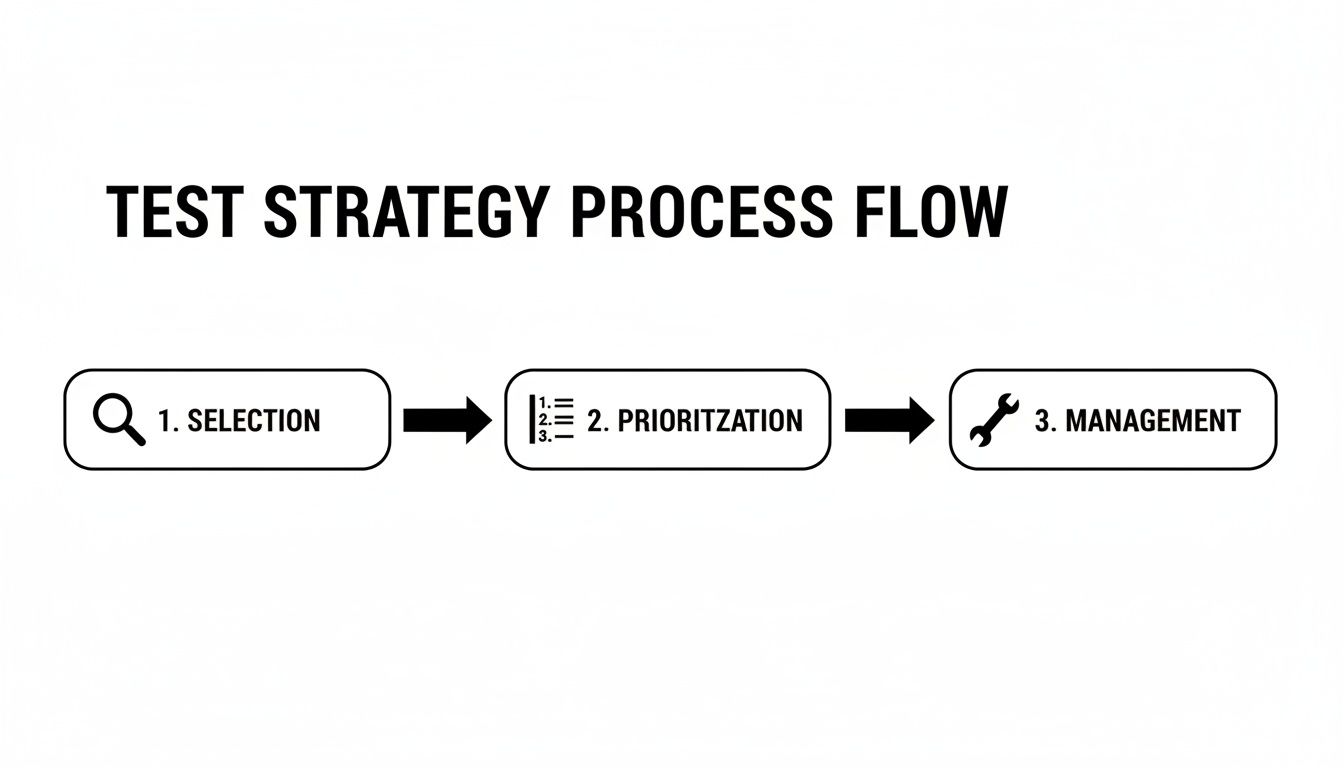
This process shows that a great test strategy isn’t just about running tests—it’s about a disciplined approach to choosing, prioritizing, and managing the right tests at the right time.
By embedding automated regression testing directly into your workflow, you create a powerful, fast feedback loop. Developers can fix their own bugs right away, overall quality improves, and the entire team can ship new features faster and with far more confidence. This tight integration makes your regression suite an asset that speeds you up, rather than a bottleneck that slows you down.
Picking the right tool for your automated regression testing is one of those foundational decisions that can make or break your entire effort. Get it right, and you’ve got an engine that accelerates your whole development cycle. Get it wrong, and you’ll find your team bogged down by flaky scripts and a maintenance backlog that never seems to shrink.
The market is full of options, each designed for different teams, different apps, and different goals. This isn’t just about picking a technology; it’s a strategic choice that directly impacts your team’s velocity and the long-term viability of your regression suite.
Let’s break down the world of test automation into three main camps. Each has a different philosophy on how to get the job done.
Choosing a tool is like picking a vehicle for a journey. A race car (a code-based framework) is incredibly powerful but demands a skilled driver. A comfortable sedan (a low-code platform) is easy for anyone to drive but might not handle off-road conditions. An autonomous vehicle (an AI agent) gets you there with minimal effort, completely changing the nature of the journey itself.
To help clarify these distinctions, here’s a high-level look at how these approaches stack up.
| Approach | Best For | Key Advantage | Primary Challenge |
|---|---|---|---|
| Traditional Frameworks | Teams with strong coding skills (SDETs) needing maximum flexibility and control. | Unmatched power and customizability for complex, unique scenarios. | High maintenance overhead; requires significant time and technical expertise. |
| Low-Code Platforms | QA-led teams aiming for faster test creation without deep programming knowledge. | Greatly improved speed and accessibility for creating standard tests. | Can be rigid or limited when dealing with highly dynamic or custom UI elements. |
| AI Agents | Teams focused on maximizing efficiency and minimizing long-term maintenance costs. | Drastically reduces test creation and maintenance time; highly scalable. | Newer technology; may have a learning curve in trusting AI-driven processes. |
Each approach has its place, and the best choice depends entirely on your team’s structure, skills, and strategic goals.
Beyond the general category, a few key factors should be at the front of your mind during any tool evaluation. Thinking through these will help you match a tool’s features to what your team actually needs.
Ask yourself these questions:
Ultimately, the goal is to find a tool that empowers your team to build a reliable safety net without becoming a bottleneck. For a deeper dive, check out this list of the top web and mobile automation tools to consider in 2025.
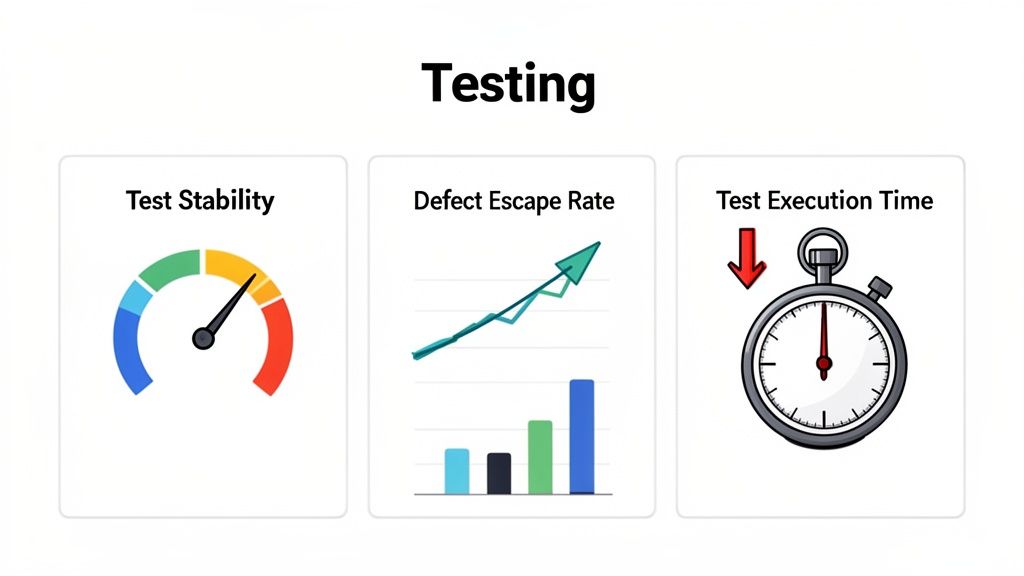
Just running tests isn’t enough. If you can’t prove their value, your automation efforts are just a line item in the budget. To show the real return on your automated regression testing, you have to track metrics that tie directly to business outcomes and developer productivity.
Think of it this way: a green test suite is great, but knowing that it’s also fast, stable, and actually stopping bugs from hitting production is what really matters. These numbers tell the story of how automation is paying off and help you answer the most important question: “Is our testing making our product better?”
To get a clear picture of how well your testing is working, you don’t need dozens of vanity metrics. A handful of high-impact KPIs will give you a real-time health check on your entire testing process.
Start with these three essentials:
Linking these metrics to business goals is how you get buy-in. A low defect escape rate doesn’t just mean fewer bugs; it means higher customer satisfaction and lower support costs. That’s a story every executive wants to hear.
These aren’t just numbers for a dashboard; they’re your guide for making things better. Is your execution time creeping up? It might be time to parallelize your tests or refine your prioritization strategy. Seeing more flaky tests? That’s a clear signal to investigate your test design or environment.
By watching these trends, you can make smart, data-driven decisions to keep your automation sharp and effective. This is how you ensure your testing efforts are always focused on the main goal: shipping high-quality software, fast.
For a deeper dive into building a solid measurement plan, check out these effective strategies for measuring the quality of automated tests.
As you start rolling out automated regression testing, the theory quickly gives way to practical, real-world questions. It’s one thing to understand the concept, but it’s another to actually implement it. Teams often run into the same hurdles around strategy, scope, and especially test data.
Let’s walk through some of the most common questions that pop up when engineering and QA teams get serious about scaling up their testing.
This is a big one. The instinct is often to automate the easiest tests, but that’s a trap. A better approach is to think in terms of risk and business impact. The first tests you automate should be the ones that protect your most critical functionality.
Ask yourself: where would a failure hurt the most?
It’s a nice thought, but aiming for 100% automation is usually a bad idea. It’s not just impractical; it’s a poor use of resources. The real magic happens when you find the right balance between automated and manual testing, letting each do what it does best.
Automated regression testing is fantastic for verifying that things you’ve already built still work. But it’s not designed to find new and unexpected bugs. That’s a job for a human doing manual, exploratory testing.
Think about it this way: automation is great for repetitive checks, but it can’t replace human intuition. You’ll always need a person for things like usability testing, validating complex visual layouts, or just answering the question, “Does this feature feel right?”
Test data is the silent killer of many automation initiatives. If your data is unreliable, your tests will be flaky, and developers will start ignoring the results. The goal is to make every test self-contained, so it doesn’t depend on a fragile, shared database state.
Here are a few solid strategies for taming the test data beast:
Ready to slash your test creation and maintenance time? With TestDriver, you can generate end-to-end tests from simple English prompts, letting our AI agent handle the heavy lifting. See how TestDriver works.
Discover how automated testing DevOps transforms your CI/CD pipeline. This guide covers practical strategies, tools, and AI's role in accelerating releases.
Discover how quality assurance in software development works. Learn modern QA processes, key testing types, and how AI is revolutionizing software delivery.
Master software testing in DevOps with our guide. Learn shift-left, automation, CI/CD integration, and AI-driven testing to boost quality and release speed.
Explore manual versus automated testing: compare use cases, ROI, and a practical framework to choose the best approach for your team.
TestDriver runs every pull request in a real desktop sandbox, finds bugs, and builds regression tests - right from your repo.