A Guide to Automated Regression Testing for Modern Teams
Discover what automated regression testing is and how to implement it. Learn key strategies for CI/CD, test selection, and measuring real business impact.
Discover how automated UI testing software streamlines QA, prevents bugs, and accelerates releases. Learn to choose and implement the right tools for your team.
Automate and scale manual testing with AI ->
Imagine you had a team of digital assistants who could meticulously test every button, link, and form on your application, 24/7. That’s essentially what automated UI testing software does. Instead of a person manually clicking through screens, this software uses scripts to simulate real user actions and automatically flag anything that’s broken. The whole point is to catch glitches in the visual part of your app before they ever reach a customer.
At its core, automated UI testing software is the last line of defense for your application’s quality. It becomes a stand-in for your users, interacting with the app just like they would—clicking, scrolling, typing, and then checking if the right thing happened. It’s all about spotting visual bugs, broken links, or unresponsive buttons that can frustrate people and hurt your reputation. This isn’t just about checking code; it’s about validating the entire user journey from start to finish.
For a deeper dive into the fundamentals, it’s helpful to understand what is automated testing in a broader sense and how it elevates software quality across the board.
In today’s market, a buggy user experience is a deal-breaker. Manual testing still has its place, but it’s slow, easily misses things, and just can’t keep up with how fast development teams move.
Think about it: could you manually test every feature on your site across five different browsers and three screen sizes after every small code update? It’s not realistic. That’s exactly the gap automated UI testing software is designed to fill.
By automating these repetitive but critical checks, teams can run thousands of tests in a matter of hours, often overnight. This gives developers a constant stream of feedback, allowing them to release new features faster and with more confidence, knowing they have a safety net to catch any unexpected side effects.
Good UI automation isn’t just about finding bugs; it’s about achieving specific goals that help both the development team and the end user. It’s become a must-have for modern teams because it helps:
UI testing is a key piece of a larger quality puzzle. To see how it fits in with other methodologies, our guide to understanding software testing provides a comprehensive overview. In the end, it’s all about shipping a polished, professional product that just works.
Picking the right automated UI testing tool isn’t a simple one-size-fits-all decision. The architecture a tool is built on—its fundamental DNA—dictates how you’ll write, run, and, most importantly, maintain your tests. Getting this choice right is about matching a tool’s philosophy to your team’s skills, the complexity of your product, and where you want to be in a year.
Think of it like building a house. You could use prefabricated walls for speed, traditional lumber for custom control, or even a 3D printer for cutting-edge efficiency. Each method works, but they come with different trade-offs in speed, flexibility, and the expertise needed to pull it off. Let’s dig into the three main approaches you’ll find in the wild.
The most direct route into automation is Record and Playback. It’s exactly what it sounds like. You hit “record,” click through your application just like a user would, and the tool captures every action—every click, every keystroke—as a step in a script. To run the test, you just hit “play.”
This method is incredibly appealing because it gets you up and running in minutes. A non-technical team member can create a basic test without seeing a single line of code, which makes it a fantastic starting point for teams just dipping their toes into automation or for scripting very simple, static tasks.
But that simplicity is a double-edged sword, and its weakness is brittleness. These recorded scripts are notoriously fragile.
btn-submit to submit-button, the test breaks. It’s looking for something that’s no longer there.For maximum control and flexibility, experienced teams lean on Code-Driven Testing. This approach means writing test scripts in a programming language like JavaScript, Python, or Java, using battle-tested frameworks like Selenium, Cypress, or Playwright. Here, your tests aren’t just like code—they are code.
The power you get is immense. Engineers can build incredibly complex scenarios with loops, conditional logic, and direct integrations with APIs and databases. They can create reusable modules and apply proper software engineering principles to build a robust, scalable test suite that is far more resilient to UI changes. For a deeper dive on how these tools work alongside newer ones, check out our guide on hybrid no-code and code tools for test automation.
Code-driven testing gives you a level of precision and scalability that other methods just can’t touch. It’s the go-to for complex apps where tests need to do more than just click buttons—they need to interact with the entire system.
The biggest hurdle, of course, is the steep learning curve. This approach demands real programming skills and expertise in specific testing frameworks. You typically need dedicated Software Development Engineers in Test (SDETs) to build and maintain the suite, which can create a bottleneck where non-coders on the QA or product team can’t contribute.
A newer, more modern approach uses artificial intelligence to get the best of both worlds: the simplicity of recording and the power of code. AI-Driven automated UI testing software works by understanding user intent, often from plain English commands, to generate and maintain tests on its own. Instead of telling it exactly what to click, you describe what a user wants to accomplish, and the AI figures out the rest.
This is where the industry is heading. The market for AI-powered software testing tools is on a tear, projected to hit $3.4 billion in 2025 and nearly double to $6.4 billion by 2035. This explosive growth, detailed in reports on futuremarketinsights.com, is fueled by the need for smarter automation that can keep up with today’s complex software.
One of the most powerful features AI brings to the table is self-healing. When a developer renames that button from our earlier example, an AI tool doesn’t just fail. It uses contextual clues, visual analysis, and machine learning models to intelligently identify the new button and update the test script automatically. This drastically cuts down on maintenance and makes your test suite far more resilient.
By focusing on user intent rather than the underlying code, these tools open up automation to everyone—from product managers to manual testers—creating a truly collaborative testing environment.
Choosing the right approach comes down to balancing your team’s skills with your application’s needs. The table below breaks down the key trade-offs between the three architectures.
| Approach | Ease of Use | Maintenance Effort | Flexibility & Power | Best For |
|---|---|---|---|---|
| Record & Playback | Very High | Very High | Very Low | Simple, stable applications; teams with no coding skills. |
| Code-Driven | Very Low | Moderate | Very High | Complex, dynamic applications; teams with dedicated SDETs. |
| AI-Driven | High | Very Low | High | Agile teams, complex applications, and collaborative environments. |
Ultimately, there’s no single “best” option. A code-driven approach might be perfect for a team of seasoned engineers building a complex financial platform, while an AI-driven tool could empower a fast-moving startup’s entire product team to own quality. Understanding these differences is the first step toward making a smart investment.
Thinking about automated UI testing as just a way to save time is selling it short. Yes, it’s faster, but that’s just scratching the surface. The real conversation is about the fundamental shift it brings to your development process—and the very real hurdles you have to clear to get there. Understanding both sides is key to making automation work for you, not against you.
The buzz around this technology is undeniable. The UI test automation market is on a rocket ship, expected to jump from $5 billion in 2025 to a massive $15 billion by 2033. Why? Because in a world of Agile and DevOps, speed is everything. Teams have seen automation slash their testing cycles by as much as 70%. That’s not a small gain; it’s a total change in pace.
But again, the true value isn’t just about moving faster.
The real magic of automation is its ability to do things that are simply not feasible for a human team. It introduces a scale and consistency to quality assurance that manual testing can never match.
Automation transforms QA from a final checkpoint into a strategic partner in building a better product. The conversation shifts from “Is it broken?” to “Is this the best experience we can create?”
The different approaches to automation—from simple recording to intelligent, AI-driven systems—each offer a different balance of these benefits.
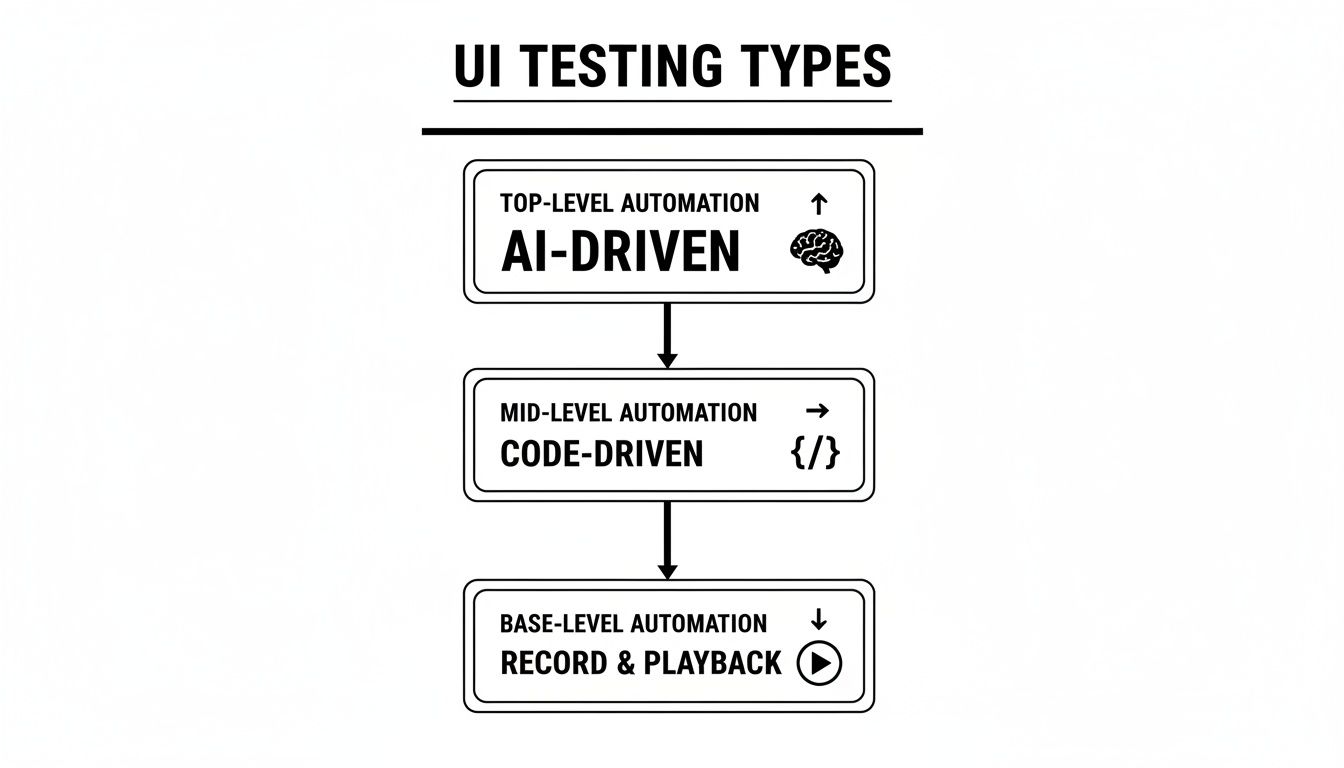
As you can see, the technology has evolved from brittle, straightforward methods to more sophisticated systems built to sidestep the classic pitfalls.
It’s easy to get excited about the upside, but ignoring the challenges is a recipe for a failed project. The roadblocks are real, especially with older, code-heavy tools that lack any modern intelligence.
First up is the significant initial setup cost. Building a solid automation framework isn’t a weekend project; it’s a full-blown software development effort. You need specialized skills, a serious time commitment, and a clear plan before you’ll see a dime of ROI.
Then there’s the notorious problem of flaky tests. Traditional scripts are incredibly fragile. A developer renames a button ID or an element shifts a few pixels, and suddenly your test fails—even though nothing is actually broken. This creates a nightmare of false alarms and a constant, soul-crushing maintenance cycle.
This high maintenance overhead is the silent killer of many automation initiatives. When engineers spend more time fixing broken tests than writing code, the entire team loses faith in the system. While these tools can be great for other tasks, like helping to generate app screenshots for marketing, none of that matters if the core tests are unreliable.
These exact problems—the high upfront cost and the brittle, high-maintenance tests—are what modern AI-driven solutions were designed to fix, making automation a far more achievable and sustainable goal for more teams.
Picking an automated UI testing tool isn’t like buying software off a shelf. It’s more like hiring a new team member. The right one slots perfectly into your workflow and becomes an indispensable partner for the long haul. A bad fit, however, just creates constant friction, stalls your releases, and eventually ends up collecting dust.
To avoid that classic case of buyer’s remorse, you have to look past the flashy marketing and dig into how a tool will solve your team’s real-world problems. This means striking a careful balance between the tool’s raw technical power and how well it fits with your team’s culture and skills. A super-powerful tool that nobody can figure out is just as useless as a simple one that can’t handle your app’s complexity. The goal is finding that sweet spot.
Before you even book a demo, start with the technical deal-breakers. These are the foundational specs that determine if a tool can even operate in your environment. If you get this part wrong, everything else is a waste of time.
Your first checkpoint should always be platform and browser support. Can the tool handle every single environment your users are in? We’re talking about the big browsers—Chrome, Firefox, Safari—but also mobile browser emulation. A tool that only supports Chrome is a complete non-starter if 15% of your user base is on Safari.
Next, look at how well it plays with others. A good testing tool doesn’t work in isolation; it has to become part of your development ecosystem.
Finally, put its reporting and debugging features under a microscope. When a test breaks at 2 a.m., your team needs clear, actionable information, not a cryptic error log. A great tool will provide detailed logs, video recordings of the test execution, and side-by-side screenshot comparisons that immediately show what went wrong.
A tool’s impressive feature list means absolutely nothing if your team can’t actually use it. This is where so many companies stumble—they pick a “best-in-class” solution that requires a level of coding expertise their team just doesn’t possess.
Think about who will be using this tool day-to-day. Are they seasoned SDETs (Software Development Engineers in Test) who live and breathe code? Or is your team made up of manual QA analysts, product managers, and developers who need something more accessible, like a low-code or no-code platform?
Forcing a highly technical, code-heavy framework on a team of non-coders is a recipe for disaster. The whole point of automation is to empower the team and speed things up, not to create a new bottleneck that only one person understands.
You also have to consider collaboration. Does the tool make it easy for people to share test results, leave comments on failures, and build test suites together? A siloed tool is an agility killer. Modern, collaborative platforms are designed for the way agile teams actually work.
You wouldn’t buy a car without taking it for a spin, right? The same logic applies here. A hands-on Proof of Concept (PoC) is easily the most important step in this entire process.
During your trial, don’t just run through the canned “happy path” scenarios the sales team showed you. Get your team to automate one or two genuinely tricky user flows from your actual application. This is where the rubber meets the road. Can it handle your dynamic UI components? Your complex forms? Your third-party iFrames?
This trial period is your chance to answer the one question that truly matters: Does this tool make our lives easier? If the answer from everyone on the team is a resounding “yes,” you’ve likely found your match.
Getting real value from automated UI testing isn’t just about writing tests; it’s about weaving them into the very fabric of your development process. This is where Continuous Integration and Continuous Delivery (CI/CD) comes into play. When you plug your UI tests directly into the pipeline, they stop being a chore you run occasionally and become a constant, automated quality gate.
Think of your test suite as a vigilant security guard for your code. Instead of just doing patrols once in a while, it stands right at the main gate, inspecting every single change before it’s allowed to move forward. This simple shift turns testing from a reactive, after-the-fact scramble into a proactive habit that nips bugs in the bud.
The whole point is to create a seamless loop: a developer pushes code, and the CI/CD pipeline instantly kicks off the entire UI test suite. That immediate feedback is the heart of modern, effective quality assurance.
The first step is to get your CI server—whether it’s GitHub Actions, Jenkins, or GitLab CI—to automatically trigger your test suite. The best time to do this is on a pull request or a commit to a main branch. This setup ensures no new code gets merged until it passes a full regression check.
This whole approach is fueled by the relentless pressure to ship software faster. As apps in demanding fields like healthcare, finance, and telecom get more complicated, DevOps teams are leaning on automated testing as their main quality gatekeeper. In fact, this strategy has been shown to slash deployment cycles by 40-50%. We’re even seeing cognitive automation push this further, with machine learning generating test cases and computer vision hitting over 97% accuracy in visual UI checks. You can dig into more data on how automation is accelerating development cycles on intelmarketresearch.com.
Integrating UI tests into CI/CD means every developer gets a clear, automated signal—pass or fail—directly within their workflow. It removes ambiguity and makes quality a shared, team-wide responsibility.
Just running the tests isn’t enough. The process has to be fast and the results have to be crystal clear. If it’s slow or unreliable, developers will start to see the tests as a roadblock, not a safety net.
To get it right, focus on a few key practices:
Nailing these strategies creates a powerful, automated feedback loop that stops bugs long before they ever get a chance to annoy a real user. For a deeper dive, check out our article on the best practices for integrating testing into your CI/CD pipeline.
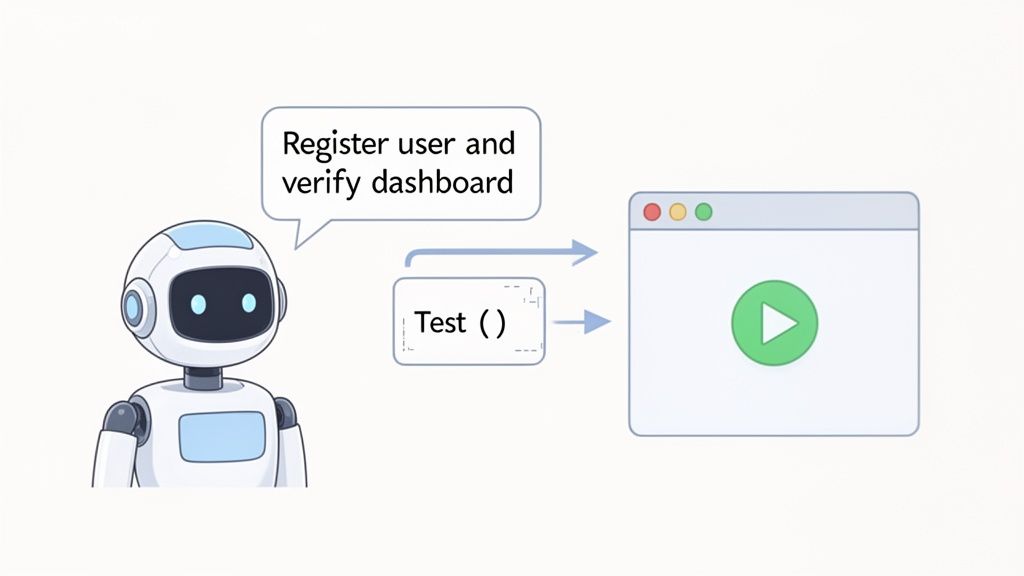
Theory is great, but the real “aha!” moment comes when you see an AI-powered tool actually do the work. Let’s walk through building a practical test for one of the most fundamental user journeys out there: signing up and landing on the dashboard.
This is where you see the biggest shift with modern automated UI testing software. The focus moves away from writing brittle, complex code and toward simply stating what you want to achieve. Instead of hunting for element selectors or figuring out wait times, you just describe the desired outcome in plain English.
Suddenly, test creation isn’t just for developers anymore. It’s fast, intuitive, and accessible to everyone from QA engineers to product managers.
Think about how you’d normally test a registration flow. With older tools, you’d have to write a script that finds the sign-up button, locates every form field, types in data, submits the form, and then maybe even navigates back to the login page to try the new credentials.
With an AI agent like TestDriver, you just tell it what to do.
You can start with a simple, high-level instruction:
“Create a test that signs up a new user with a random email and password, then confirms they are logged in and can see the welcome message on the dashboard.”
The AI agent takes that sentence and figures out the rest. It translates your intent into a series of concrete steps, understanding concepts like “sign up,” “log in,” and “dashboard” in the context of your specific application. It intelligently finds the right UI elements and performs the actions needed to get the job done.
The AI doesn’t just make a wild guess. It actually analyzes your application’s structure to map out the most logical path. It understands that a sign-up process usually involves filling out a form, clicking a button, and getting redirected to a new page.
Here’s how you could break that prompt down into more specific steps:
The example below shows the AI generating a test directly from a GitHub repository.
You can see how a simple, plain-language prompt gets turned into a structured, runnable test file. It’s a direct line from what you want to a fully automated script.
A task that could have easily taken hours of meticulous coding can now be done in minutes. This speed is a game-changer, letting your team build out comprehensive test suites that cover all your critical user flows without getting stuck in the weeds of implementation.
Switching to automated UI testing is a big move, and it’s natural to have questions. Teams often wonder how these new tools will slot into their current workflows and what the day-to-day reality will look like. Getting the right answers upfront is the best way to get everyone on board and make the transition a success.
Let’s tackle some of the most common questions head-on to clear up any confusion about UI automation.
It helps to think of your application like a newly constructed house.
Unit tests are like checking the quality of individual bricks and boards. They make sure each tiny, isolated piece of code works correctly on its own. API tests are like inspecting the plumbing and wiring hidden in the walls—they verify that all the different systems (services) can communicate with each other properly.
UI testing, on the other hand, is the final walkthrough with the homebuyer. Does the front door open smoothly? Do the light switches turn on the right lights? Is the kitchen layout intuitive? It’s the only type of testing that truly mimics how a real person interacts with the finished product, confirming everything comes together into a seamless experience.
It’s a tempting goal, but trying to automate 100% of your UI tests is usually a bad idea. Not only is it impractical, but it’s also a poor use of your team’s time and talent. Some things just need a human eye—think subtle design flaws, awkward user flows, or the overall aesthetic appeal of the interface.
A much smarter approach is to automate the repetitive, high-stakes stuff: critical user paths, tedious regression checks, and tests that involve tons of different data inputs. This frees up your skilled QA engineers to do what they do best: creative, exploratory testing that uncovers the weird edge cases automation would miss.
This hybrid strategy delivers the best of both worlds. You get the speed and consistency of automation for the core functionality, plus the sharp, critical thinking of a human for everything else.
This has always been the Achilles’ heel of traditional test automation. Older tools are brittle; they rely on rigid selectors like a button’s specific ID to find it on the page. The moment a developer tweaks that ID, the test breaks—even if the button looks and works exactly the same. This constant breakage turns test maintenance into a soul-crushing chore.
Modern automated UI testing software built with AI is far more robust. It learns to see your application the way a person does, using a combination of visual cues, text labels, and its position on the page to identify elements.
id="submit-button", an AI tool recognizes “the main submission button on the login form.”This self-healing capability is a game-changer. It drastically cuts down the time you waste fixing broken tests and makes your entire automation suite far more stable and trustworthy.
Ready to see how an AI agent can transform your testing workflow? TestDriver helps you generate robust end-to-end tests from simple prompts, cutting down on maintenance and accelerating your release cycles. Create your first AI-powered test in minutes.
Discover what automated regression testing is and how to implement it. Learn key strategies for CI/CD, test selection, and measuring real business impact.
Discover how to create test case strategies that catch bugs early. This guide covers templates, real-world examples, and AI-powered QA.
Discover how automated testing DevOps transforms your CI/CD pipeline. This guide covers practical strategies, tools, and AI's role in accelerating releases.
Discover how quality assurance in software development works. Learn modern QA processes, key testing types, and how AI is revolutionizing software delivery.
TestDriver runs every pull request in a real desktop sandbox, finds bugs, and builds regression tests - right from your repo.