A Practical Guide to Automated Testing DevOps
Discover how automated testing DevOps transforms your CI/CD pipeline. This guide covers practical strategies, tools, and AI's role in accelerating releases.
Explore continuous testing in devops and how it strengthens QA in CI/CD pipelines for faster, reliable software releases.
Automate and scale manual testing with AI ->
Continuous testing in DevOps isn’t just about running more tests; it’s a fundamental shift in how we think about quality. At its core, it’s the practice of executing automated tests as an integral part of the software delivery pipeline, from the first line of code to the final deployment. This gives teams immediate feedback on the business risks tied to a release candidate, making quality something you build in, not just inspect at the end.

Think of an old-school car factory. Quality control happens at the very end of the assembly line. If an inspector finds a deeply buried engine wire is faulty, the entire car has to be painstakingly disassembled to fix it. This is slow, incredibly expensive, and a perfect parallel to how traditional quality assurance (QA) worked for years—as a final, isolated phase.
Continuous testing in DevOps completely flips that model on its head. It’s like having quality checks at every single station on that modern assembly line. The moment a developer commits code, automated tests kick off, providing a constant, real-time stream of feedback. This isn’t just a process tweak; it’s a complete cultural and philosophical change.
For decades, the QA team was the final gatekeeper—the last barrier between development and a product release. This structure naturally created bottlenecks, delayed delivery, and often fueled an “us vs. them” tension between developers and testers.
Continuous testing breaks down that silo for good.
Testing is no longer a final hurdle to clear. Instead, it’s woven directly into the daily workflow of development. It actually enables developers to move faster and with more confidence because they get critical feedback in minutes, not days or weeks. This simple change transforms quality from one team’s isolated job into a shared responsibility across the entire organization.
Continuous testing isn’t about testing more; it’s about getting faster, more relevant feedback. The goal is to assess business risk at every stage of the pipeline, so the team can make informed decisions about whether a release is ready for customers.
While the technical benefits are huge, the real power of continuous testing shows up in measurable business results. When you catch defects the moment they’re introduced—when they are cheapest and easiest to fix—the impact on the bottom line is undeniable.
This constant validation process delivers a few key advantages:
Ultimately, continuous testing is the engine that allows DevOps to deliver on its core promise of speed and stability. It’s the safety net that empowers teams to innovate without fear, delivering tangible value that leadership can see and customers can feel.
Getting continuous testing right is about so much more than just buying a new tool. It’s a genuine shift in culture, built on a few core ideas that completely change how teams think about quality. If you want to build a testing practice that’s resilient, fast, and actually works, you have to start with these principles. Think of them as the foundation for your entire quality strategy.
This is all about moving testing from a siloed, end-of-the-line activity into something that happens constantly, woven into every step of the development process. It means quality becomes everyone’s job—from the developer writing the first line of code to the SRE keeping it running in production. That’s the only way to get the speed and stability that DevOps promises.
The most important idea in continuous testing is to shift left. Picture your development lifecycle on a timeline. The “left” is where ideas and code are born; the “right” is where your software goes live. Traditionally, testing was crammed all the way over on the right, right before a release. Shifting left means pulling all that testing activity as early into the process as possible.
This isn’t just about running tests earlier. It’s about preventing bugs from ever being written in the first place. When a developer gets feedback just minutes after pushing a change, they can fix a problem while the logic is still fresh in their head. It’s infinitely cheaper and faster than finding that same bug weeks later during a painful, pre-release QA cycle.
Here’s a simple, everyday example:
Automation is the engine that powers continuous testing. Let’s be honest, without it, you can’t deliver rapid feedback across the entire pipeline. It’s just not humanly possible. The goal is to automate everything that’s repetitive and predictable, which frees up your human testers to focus on what they do best: exploratory testing, creative problem-solving, and big-picture strategy.
The industry has already caught on. By 2025, nearly 85% of global organizations had made automated testing a core part of their DevOps approach. With 80% of teams also standardizing on continuous integration, the results speak for themselves. High-performing DevOps teams are deploying code 46 times more frequently and recover from failures 96 times faster than their peers.
Automation isn’t about replacing testers. It’s about empowering them. It handles the boring, repetitive work so they can use their uniquely human skills—creativity, intuition, and critical thinking—to find the tricky, complex bugs that automated scripts will always miss.
Getting this balance right is crucial. For some practical advice on this, check out our guide on balancing test stability and speed in CI/CD pipelines.
Finally, none of this matters if your tests are running in an environment that looks nothing like production. Testing on a developer’s laptop is fine for a quick check, but it will never catch the complex issues that pop up in a live system. Inconsistent environments are the number one cause of the classic “but it worked on my machine!” headache.
To solve this, modern teams use tools like Docker and Kubernetes to spin up clean, consistent test environments for every single test run. When your test environment perfectly mirrors production—same OS, same network rules, same databases and services—you can actually trust your test results. This simple principle ensures your feedback isn’t just fast, it’s reliable.
A truly effective continuous testing strategy isn’t just about buying a bunch of tools. It’s about engineering a well-oiled machine, where every test, every script, and every environment works in perfect concert. The goal is to build a pipeline that intelligently sequences different kinds of tests across the entire development lifecycle. This gives you the fastest possible feedback when it matters most, without ever compromising on deep, comprehensive quality checks.
Think of your pipeline as a series of quality gates. Each time a developer commits new code, it starts a journey through these gates. The first gates are designed for speed—they give an almost instant verdict on basic code health. As the code proves its stability by passing these initial checks, it moves on to more complex and time-consuming gates, which ensure it’s truly robust and ready for production.
The secret to a fast and reliable pipeline is aligning specific test types with each stage of the CI/CD process: Commit, Build, Test, and Deploy. This structure is designed to catch simple bugs immediately, saving the more resource-intensive tests for later in the cycle once you have more confidence in the build.
Here’s a practical blueprint for how this works:
The following table breaks down where each test type provides the most value within the CI/CD pipeline.
| CI/CD Stage | Primary Test Types | Objective |
|---|---|---|
| Commit | Static Code Analysis, Unit Tests | Catch simple syntax errors, code smells, and logic bugs in isolated components instantly. |
| Build | Component Tests, Integration Tests | Verify that different parts of the application and external services can communicate and work together correctly. |
| Test | End-to-End (E2E) Tests, Performance Tests, Security Scans | Validate complete user workflows from the user’s perspective, check for bottlenecks, and identify vulnerabilities. |
| Deploy | Smoke Tests, Canary Analysis, Monitoring | Confirm that the deployment was successful and that core functionalities are working in the live production environment. |
This tiered approach ensures you get the right feedback at the right time, preventing small issues from snowballing into major problems down the line.
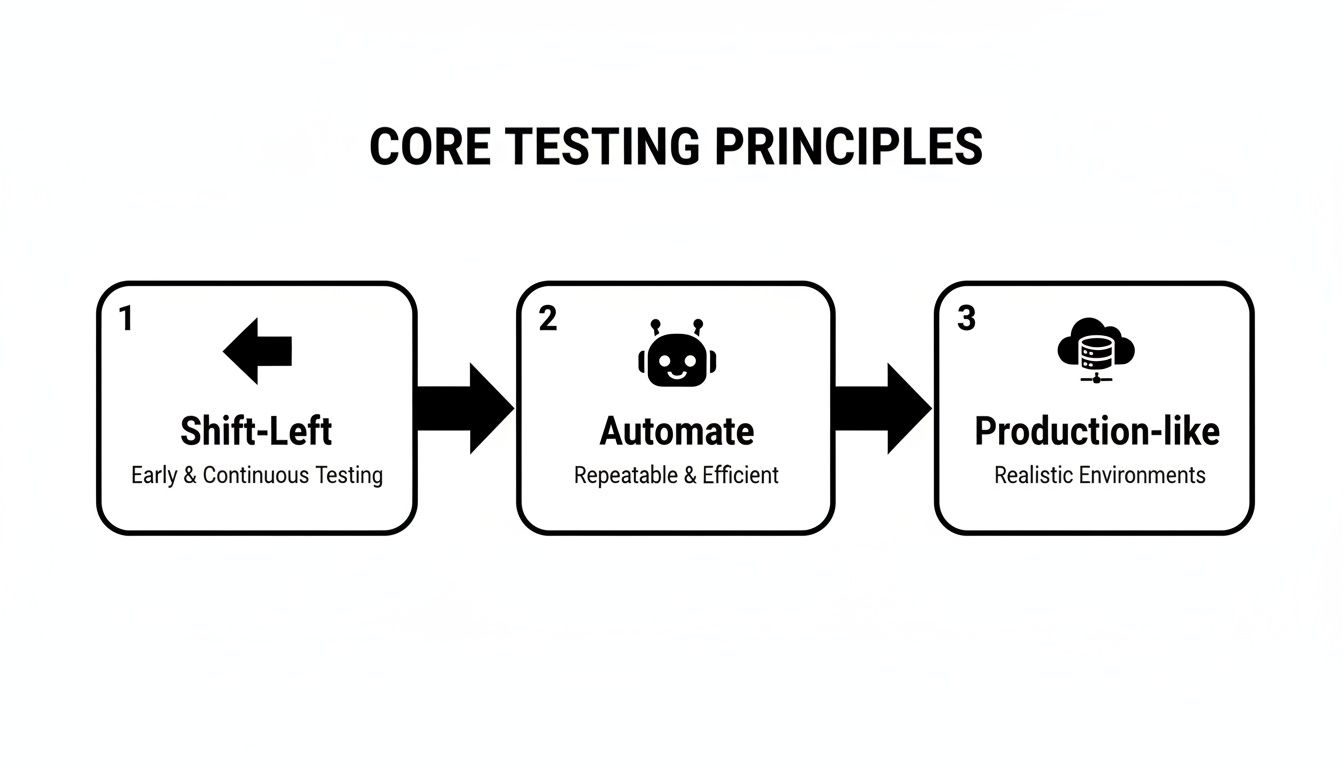
The image above really drives home the core ideas here. By shifting testing left into the developer’s workflow, automating everything you can, and testing in environments that mirror production, you build a solid foundation for reliable, high-speed feedback.
To keep your testing suite from becoming slow, brittle, and expensive, you need a smart way to balance your different test types. That’s where the Test Pyramid comes in. It’s a simple yet incredibly powerful model that provides a blueprint for your test automation architecture. The pyramid’s shape itself tells you where to focus the bulk of your automation efforts for the best return on investment.
Picture a pyramid with three distinct layers:
Following the Test Pyramid helps you avoid the dreaded “Inverted Pyramid” or “Ice Cream Cone” anti-pattern. This is what happens when teams rely too heavily on slow, flaky E2E tests, leading to painfully long feedback cycles, high maintenance overhead, and a CI/CD pipeline everyone dreads running.
Getting your pipeline structure right is a massive step forward. To get into the nitty-gritty, you can explore some of the best practices for integrating testing into your CI/CD pipeline to see how these concepts translate into the real world. By thoughtfully designing your pipeline and sticking to the principles of the Test Pyramid, you create a system that delivers fast, reliable feedback—empowering your team to ship amazing software with confidence.
For years, we’ve talked about test automation as the key to unlocking speed in DevOps. The reality, though, has often been a grind. We swapped manual testing for the endless, soul-crushing task of maintaining brittle test scripts. It felt like we were just trading one problem for another.
But that’s starting to change, and fast. Artificial Intelligence isn’t just a buzzword in testing anymore; it’s a practical tool that’s finally delivering on automation’s original promise. It’s making our tests smarter, more resilient, and way more efficient.
Instead of just blindly following a script, AI-powered tools can actually understand an application. They can see when things change, figure out what happened, and in many cases, fix the tests themselves. This is the breakthrough that helps us achieve true continuous testing in DevOps without getting bogged down in script maintenance.
Anyone who’s worked with traditional test automation knows the pain. A developer changes a button’s ID, tweaks a form layout, and bam—a dozen tests fail. These aren’t real bugs, but someone still has to stop what they’re doing, dig through the failures, find the change, and update every single broken script. It’s a tedious cycle that puts the brakes on the whole delivery pipeline.
AI brings a much-needed layer of intelligence to this problem. Modern tools use clever techniques to identify on-screen elements by their function and context, not just a fragile piece of code.
This unlocks some seriously powerful capabilities:
Beyond just fixing broken tests, AI is now starting to create them. This is a massive leap forward, especially for teams that have struggled to build good test coverage from the ground up. Tools like TestDriver let engineers describe a user flow in plain English, and an AI agent takes that and generates a complete, working end-to-end test.
Think of it like this: traditional automation is like giving someone a rigid, turn-by-turn list of driving directions. If a single road is closed, they’re stuck. AI-powered testing is like giving them a destination and a GPS that automatically finds the best route, rerouting around any obstacle it finds.
This isn’t just a niche trend; it’s being adopted quickly. By 2025, an estimated 55% of organizations worldwide will be using AI tools in their development and testing processes, with that number jumping to 70% for mature DevOps teams. This is a direct response to the fact that test maintenance eats up 20% of a team’s time, while a dismal 14% of teams feel they have high test coverage. If you’re weighing your options, understanding the differences between AI vs. RPA for business process automation can also help clarify where each technology fits best.
Let’s be clear: the goal of AI in testing isn’t to replace humans. It’s about augmenting our skills. By offloading the repetitive, frustrating work of writing and fixing basic scripts, AI frees up QA professionals to focus on the things that require a human brain.
This means more time for:
By bringing AI into the fold, we can finally move past the old limitations of automation. We can build better test suites, get faster feedback, and let our smartest people focus on solving the truly hard quality problems.
A continuous testing strategy is only as good as the tools that power it. Principles and good intentions are great, but they don’t run tests. Think of it like a high-performance auto shop—you can’t build a race car with just a single wrench. You need a full set of specialized tools that work together perfectly. Your testing pipeline is the same; it needs a carefully chosen toolchain to run smoothly and efficiently.
This toolchain is the technical foundation of your entire CI/CD process. Each piece has a specific job, from the moment a developer commits new code all the way to deployment. Getting this combination right is the key to unlocking the speed and quality that continuous testing in DevOps promises.
At the center of it all is an orchestration tool. This is the conductor of your automation symphony, telling every other tool when to start and stop. It kicks off builds, runs test suites, and manages deployments in the right order. It’s the central nervous system that ties your entire workflow together.
Some of the most common choices here are:
Your orchestrator is what makes the process continuous, automatically triggering the testing pipeline every time a code change is detected.
Beyond the orchestrator, a few other tool categories are absolutely essential for a solid pipeline. Each one handles a different part of the development and testing lifecycle, and together they ensure quality is built in right from the start.
Source Control Management (SCM) This is ground zero. It’s where your code lives and where all collaboration happens. Every pipeline starts with a change here.
git push is the starting gun for the whole process.Test Automation Frameworks These are the engines that actually run your tests. The one you pick depends heavily on what you’re testing—a web front-end, a mobile app, or a backend API.
Containerization and Environments Tests need to run in clean, consistent environments that mimic production, otherwise the results are useless. Containers solve this problem by packaging an application and all its dependencies into a neat, portable box.
The real magic of a toolchain isn’t in any single tool, but in how they all connect. A seamless flow—where a Git commit automatically tells Jenkins to spin up a Docker container to run a suite of Cypress tests—is what creates a truly continuous and automated feedback loop.
This interconnected system is what gives developers fast, reliable feedback, letting them catch bugs early and ship code with confidence. Assembling the right stack is a huge step toward making your continuous testing goals a reality.
For a long time, security and performance testing were treated like the final exam before graduation—a high-stakes, stressful event right before the big release. This old way of working is a classic recipe for missed deadlines and costly failures. In a true continuous testing in DevOps culture, we stop treating them as afterthoughts. Instead, they become core quality attributes, baked into the product from the very first line of code.
This is the essence of “shifting left.” By pulling security and performance checks into the daily CI/CD pipeline, teams find vulnerabilities and bottlenecks while they’re still small, simple, and cheap to fix. The idea is to make these tests as routine and unremarkable as running a unit test, giving developers immediate feedback on crucial non-functional requirements.
This approach is what we now call DevSecOps. It’s about automating security checks at every stage of development and making security a shared responsibility, not just a job for a separate team. The key is to integrate the right tools directly into the developer’s workflow so it becomes second nature.
Here are some of the most common automated security practices you’ll see:
If you want to dig deeper, here are some effective strategies for integrating security testing in your development process. For more intensive validation, bringing in outside experts like these Top Pen Testing Services can provide that extra layer of confidence.
Performance testing also needs to shed its reputation as a one-off event run by a specialized team. By running small, lightweight performance tests with every single build, you can catch performance regressions the moment they happen. This could be as simple as a quick load test against a specific microservice or API endpoint.
The point isn’t to run a massive, system-wide load test on every commit. It’s about establishing a performance baseline and getting an instant alert when a new change causes a noticeable slowdown or eats up more resources.
This isn’t just a niche practice; it’s becoming an industry standard. The 2025 State of Continuous Testing Report found that nearly 50% of organizations are making vulnerability scans a top priority next year. On top of that, 61% of DevOps teams have already adopted DevSecOps principles. When you make security and performance an early, continuous part of your pipeline, you stop seeing them as risky final hurdles and start treating them as what they are: everyday quality checks.
Switching to continuous testing is a big move. It’s more than just new software; it’s a fundamental change in how teams think about quality. As you navigate this shift, questions are bound to come up.
Let’s tackle some of the most common ones to clear the air and help you move forward with confidence.
This question comes up all the time, and it’s a good one because the two are often used interchangeably. But they’re not the same thing.
Think of it like this: test automation is the tactic, while continuous testing is the strategy.
Bottom line: you can’t do continuous testing without a solid foundation of test automation. But just having automation doesn’t mean you’re actually doing continuous testing.
Staring at a mountain of manual test cases can be overwhelming. The secret is to not try and climb it all at once.
Start small, and aim for a quick, visible win.
Look for the low-hanging fruit with the biggest impact. Good candidates are often repetitive smoke tests or the core regression suite that has to be run for every single build. Automate that small but critical set of tests first and plug it into your CI process. You’ll immediately free up your team, get faster feedback, and build the momentum you need to tackle the next set of tests.
Not a chance. In fact, it does the exact opposite—it makes them more valuable than ever.
Continuous testing gets rid of the monotonous, repetitive work that burns people out. It automates the gatekeeping and frees up your QA pros to do what humans do best: think critically and creatively.
Their role evolves from a manual checker to a true quality champion. They can now focus their expertise on things like complex exploratory testing, digging into usability issues, shaping the overall test strategy, and hunting down those tricky, elusive bugs. Their unique skills aren’t just needed; they’re essential.
Ready to see how AI can accelerate your testing efforts? TestDriver helps your team generate end-to-end tests from simple English prompts, cutting down on script maintenance and boosting coverage. See it in action at TestDriver.ai.
Discover how automated testing DevOps transforms your CI/CD pipeline. This guide covers practical strategies, tools, and AI's role in accelerating releases.
Master software testing in DevOps with our guide. Learn shift-left, automation, CI/CD integration, and AI-driven testing to boost quality and release speed.
Discover how to generate test cases automatically using AI. This practical guide covers effective prompts, CI/CD integration, and real-world QA strategies.
Master automated testing using Jenkins with our practical guide. Learn to build CI/CD pipelines, integrate testing tools, and scale your QA efforts effectively.
TestDriver runs every pull request in a real desktop sandbox, finds bugs, and builds regression tests - right from your repo.