How to Prepare Test Cases A Guide for Modern QA Teams
Learn how to prepare test cases that improve software quality. This guide covers everything from requirements analysis to AI-powered automation for QA pros.
Learn how to write testcase with practical examples, clear structure, and automation tips to boost software quality.
Automate and scale manual testing with AI ->
At its core, writing an effective test case is about creating a clear, repeatable script to verify a specific piece of software functionality. This means defining any necessary preconditions, outlining precise steps, and stating an unambiguous expected result. The goal is simple: anyone should be able to execute the test and get a consistent outcome.
Let’s be honest—writing test cases often feels like a tedious chore. It’s easy to dismiss them as just another box to check in the process of finding bugs. But what if they were actually your team’s most powerful tool for building better software, faster? Shifting this perspective is the first step toward understanding how to write a test case that delivers real value.
Think of well-crafted test cases as the foundation of clear communication. They become a shared language between developers, QA pros, and product owners, turning abstract requirements into concrete, verifiable scenarios that everyone can agree on.
Without clear test cases, ambiguity takes over. I’ve seen it happen time and again: a developer interprets a feature one way, while the QA team expects something completely different. This kind of misalignment inevitably leads to frustrating bug-fix loops, blown deadlines, and a final product that doesn’t quite match the original vision.
Great test cases cut through the guesswork. They act as a single source of truth that defines exactly how a feature should behave under specific conditions, ensuring everyone is building toward the same goal from the very beginning.
Sure, identifying defects is a huge part of their job, but the benefits of exceptional test cases go much deeper. They provide a critical safety net for your most important features, making sure new code changes don’t unintentionally break something that was already working perfectly. This process, regression testing, is nearly impossible to do reliably without a solid suite of test cases to fall back on.
A well-documented test case is a form of living documentation. It not only verifies current behavior but also helps new team members quickly understand the application’s intended functionality without digging through code.
On top of that, the very act of writing a test case forces you to analyze the requirements more deeply. It often brings to light tricky edge cases and potential usability problems long before a developer writes a single line of code, which saves a massive amount of time and money down the road.
The data backs this up. Organizations that link test cases directly to requirements can see a 30–45% reduction in defects that make it into production. You can dig into more stats on test case effectiveness by checking out recent industry reports.
Ultimately, a small upfront investment in writing clear, comprehensive test cases delivers a huge return. You’ll catch issues earlier, slash rework, and consistently ship software that actually meets user expectations. They aren’t just a task to be completed—they’re a strategic asset for any high-performing software team.
So, what’s the real difference between a test case that causes confusion and one that anyone on the team can run without a single question? It’s all about the anatomy. A solid, well-thought-out structure is what makes a test repeatable, clear, and genuinely effective. It leaves absolutely no room for guesswork.
I like to think of it like a recipe. A great recipe gives you the ingredients (preconditions), the step-by-step instructions (test steps), and a picture of the final dish (expected results). If you’re missing any of those key pieces, you’re just winging it, and that’s not something you want to do in software testing.
First things first: every single test case needs a unique identifier, or a Test Case ID. This isn’t just about keeping things neat and tidy; it’s the bedrock of good traceability. A simple ID like TC-LOGIN-001 immediately signals its purpose and, more importantly, lets you link it directly back to a requirement or user story in a tool like Jira.
This link is incredibly powerful. When a test fails, you can instantly trace its origins back to the requirement it was designed to validate. This makes debugging much faster and gives managers a clear view of test coverage—what percentage of our requirements have actually been tested?
Right after the ID, you need a descriptive title. “Test Login” is lazy and unhelpful. Something like, “Verify Successful Login with Valid Credentials,” tells the tester exactly what’s about to happen and why. It sets the scene.
Before you even think about executing a test, you have to get the environment just right. This is what preconditions are for. They are the non-negotiable conditions that must be met before the first test step is even attempted.
Imagine you’re testing the “add to cart” feature on an e-commerce site. Your preconditions would look something like this:
If you skip this, you’re asking for trouble. You’ll get false negatives—tests that fail not because of a bug, but because the setup was wrong. That sends developers on a wild goose chase for a problem that doesn’t even exist, wasting everyone’s time.
A great test case makes zero assumptions. By clearly spelling out all preconditions, you eliminate the variables. Any failure from that point on points directly to a flaw in the application’s logic, not the test setup.
Now we get to the core of it: the test steps and expected results. Every step must be a single, clear, actionable instruction. Please, don’t cram multiple actions into one step.
Instead of writing something vague like, “Find a product and add it to the cart,” break it down into granular actions:
For every single action, there must be a corresponding expected result. This is where you describe exactly what the system should do. An expected result of “It should work” is completely useless. You have to be precise.
For that last step, a rock-solid expected result would be: “The shopping cart icon in the header updates to show ‘1’ item, and a confirmation message ‘Wireless Mouse has been added to your cart’ is displayed.” There’s no ambiguity there. The test either passed or it failed.
To get even more detail on these fundamentals, take a look at our guide on the best practices for structuring effective test cases.
Bringing all these elements together gives you a self-contained guide for validation. It’s so much more than a simple checklist; it’s a vital piece of documentation that builds consistency and quality into your process.
Here’s a quick breakdown of how these components fit together in a real-world scenario.
| Component | Purpose | Best Practice Example |
|---|---|---|
| Test Case ID | Provides a unique identifier for tracking and traceability. | TC-PAYMENT-005 |
| Title | A short, descriptive summary of the test’s objective. | Verify payment fails with an expired credit card. |
| Preconditions | Conditions that must be true before starting the test. | User is logged in. One item is in the cart. User is on the checkout page. |
| Test Steps | Sequential, actionable instructions to execute the test. | 1. Enter expired card details. 2. Click “Place Order”. |
| Expected Result | The specific, observable outcome that indicates success. | An error message, “Your card has expired,” is displayed. |
When you apply this structure consistently to every test case you write, you’re not just writing tests—you’re building a robust, reliable testing suite. You’re creating an asset that anyone on your team can understand and execute, which ultimately leads to better software and a much smoother QA process.
Let’s be honest, staring at a user story and trying to figure out all the ways it could break can feel like an overwhelming, unstructured mess. It doesn’t have to be. With a solid workflow, you can turn that creative guesswork into a repeatable engineering discipline. This is your playbook for building a test plan that actually covers what matters without wasting a ton of effort.
It all starts with getting a deep understanding of the product requirements. A crucial part of this workflow is a thorough document analysis of any specs, user stories, or design mockups you have. This first step ensures you’re not just testing what you think a feature should do, but what it’s actually supposed to accomplish.
The diagram below breaks down the core anatomy of a test case, mapping the journey from a high-level goal to a concrete, verifiable outcome.
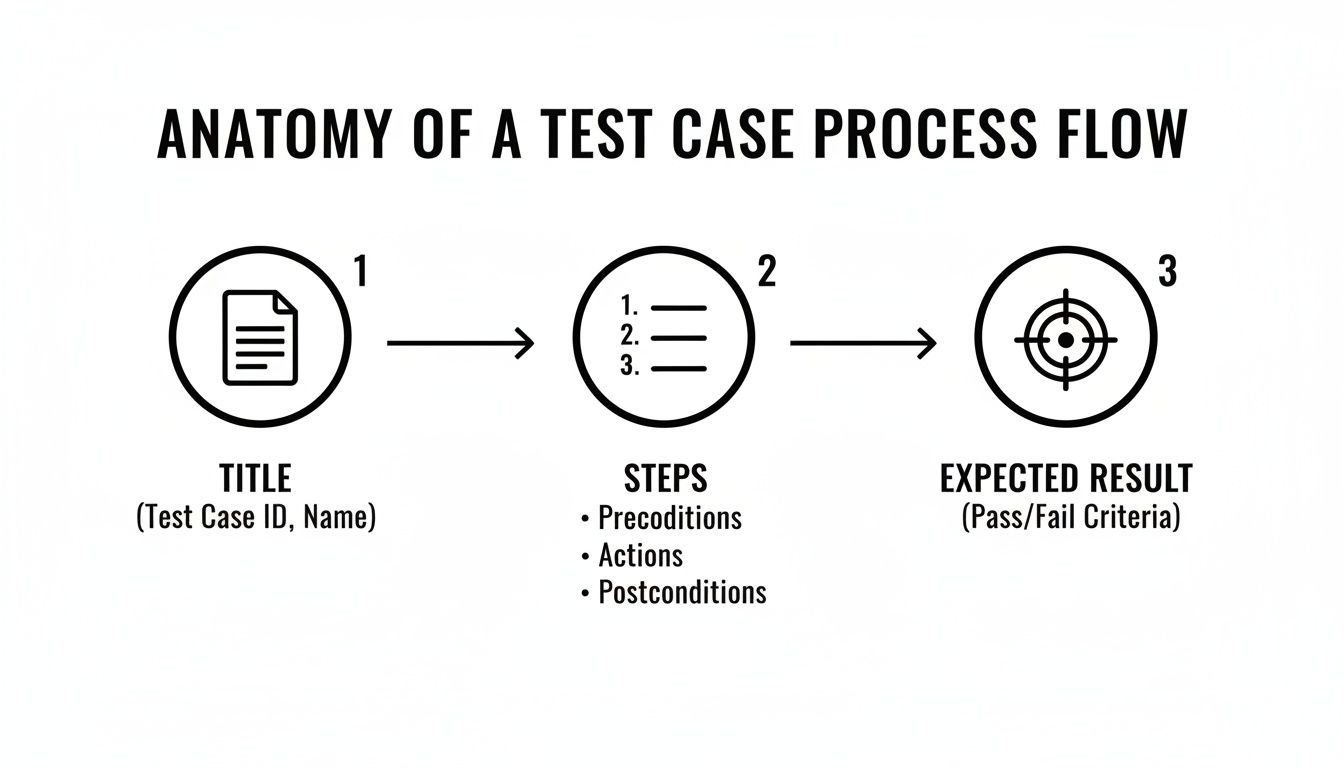
Think of it this way: a powerful test case is a story. It has a clear objective (the title), a precise set of actions (the steps), and a predictable ending (the expected result).
Your source material is almost always a user story or a feature specification. The very first thing you need to do is break it down into smaller, testable scenarios. A single user story, like “As a user, I want to be able to reset my password,” is packed with different paths that all need validation.
Put on your detective hat and start brainstorming every possible interaction you can think of.
This brainstorming phase is where you’ll find the gold. Don’t censor your ideas—just get everything down on paper. This is how you uncover the kinds of bugs no one else even considered. For some advanced brainstorming methods, check out how you can effectively improve test cases using heuristics, which are basically mental shortcuts for unearthing potential problems.
After brainstorming, you’ll have a long list of scenarios. You’ll quickly realize you can’t possibly test everything with the same intensity for every single release. This is where prioritization becomes your superpower. Not all bugs are created equal; some are minor annoyances, while others can bring your entire business to a grinding halt.
A simple, effective way to prioritize is to ask two questions for each scenario:
By scoring each scenario against these two criteria, you can build a prioritized list. This ensures your most critical workflows get the attention they deserve, protecting both your users and the business from the most damaging issues.
Your goal isn’t just to find bugs; it’s to find the most important bugs first. Risk-based prioritization is the best way to focus your limited time and resources where they’ll have the biggest impact.
With your prioritized scenarios ready, it’s time to start writing the actual test cases. Each scenario you’ve identified will probably blossom into one or more formal test cases, each following that clear structure we talked about earlier.
Let’s take our negative path scenario, “User enters an unregistered email,” and turn it into a concrete test case:
TC-RESET-002Enter unregistered.user@email.com into the email field.
Click the “Send Reset Link” button.
Expected Result: An error message stating “Email address not found. Please check your entry or sign up for an account.” is displayed below the email field. The page does not redirect.
This workflow gives you a clear, repeatable path from a high-level requirement all the way down to a detailed, actionable test case. It guarantees your testing efforts are tied directly to user stories, prioritized by real-world risk, and structured for clarity. By adopting a systematic approach like this, you methodically build a robust testing strategy that truly safeguards your application’s quality.

Theory is one thing, but seeing well-written test cases in action makes all the difference. Let’s get our hands dirty and move from abstract concepts to practical application. Walking through these real-world examples will show you exactly how the principles we’ve discussed apply to different layers of an application.
We’ll look at the user interface, dip into the backend with an API test, and then bring it all together with a complete end-to-end scenario. Think of these as templates you can grab and adapt for your own work.
The login form is the front door to your application. If it breaks, nobody gets in. That’s why it’s one of the most critical components to test. This specific case checks a negative path: what happens when a known user messes up their password.
Pay close attention to how specific the title and expected results are. There’s zero ambiguity.
Test Case ID: TC-LOGIN-003
Title: Verify error message displays for a valid user with an incorrect password.
Preconditions:
valid.user@example.com already exists.Test Steps:
valid.user@example.com into the “Email” input field.WrongPassword123 into the “Password” input field.Expected Result:
This test case is short, sweet, and incredibly detailed. The tester knows precisely what to do, what data to use, and what outcomes to look for. That’s the level of detail that ensures consistent, reliable testing every time.
Now, let’s peek behind the curtain at the backend. API testing is fundamental for confirming that the business logic and data powering your application are solid. Here, we’ll test a GET endpoint that’s supposed to fetch a specific user’s profile.
With API tests, you’re focused on things the user will never see, like HTTP status codes and the structure of the JSON response.
Test Case ID: TC-API-USER-001
Title: Verify successful retrieval of a user profile with a valid User ID.
Preconditions:
userId=101 exists in the database and has a username of “TestUser”.Test Steps:
GET request to the endpoint: /api/users/101.Authorization header with a valid bearer token.Expected Result:
userId key with the value 101.username key with the value “TestUser”.password key.When testing an API, think of verification as a two-step process. First, you confirm technical success (the right status code). Then, you validate the business logic—is the data itself correct and, just as importantly, secure?
Alright, let’s put it all together. End-to-end (E2E) tests simulate a complete user journey from start to finish. This is where you find out if all the individual components—UI, APIs, databases—can actually work together to accomplish a business goal.
This example follows a user as they add an item to their cart and complete the purchase.
Test Case ID: TC-E2E-CHECKOUT-001
Title: Verify a logged-in user can add an item to the cart and complete the checkout process.
Preconditions:
ecom.user@example.com).Test Steps:
Expected Result:
Because it spans multiple pages and user interactions, this E2E test is naturally longer. Each step is a checkpoint in a critical business workflow. Mastering how to write test cases that cover these full journeys is a skill that directly protects your most important, revenue-generating features.
Automation is a game-changer for software testing, but it’s no magic wand. One of the biggest traps I see teams fall into is trying to automate everything. This almost always backfires, leaving them with a brittle, high-maintenance test suite that eats up more time than it saves.
The real art is in making smart, strategic calls about what to automate and, just as crucially, what to leave in the hands of a human tester. Automating the wrong test case is a colossal waste of resources. It’s all about striking that perfect balance between human intuition and machine efficiency.
Recent industry reports back this up. While automation is widespread—with 70–77%+ of companies using it—a full-scale replacement of manual testing is incredibly rare. The smartest teams blend their strategies. You can get a better sense of how teams are approaching this by checking out the latest test automation statistics.
So, how do you pick the winners? What makes a manual test case a prime candidate for automation? You’re looking for a specific set of characteristics. The best targets are tests that are repetitive, stable, and carry significant business risk if they fail.
Your regression suite is the first place you should look—those tests you run again and again with every single release to make sure nothing broke. These are your heavy hitters.
Here’s what makes a test case ‘automation-friendly’:
Here’s a pro tip: write your manual tests from day one as if you know they’ll be automated eventually. This habit makes the eventual handoff from manual to automated incredibly smooth. It forces you to write with the kind of precision and clarity an automation script demands.
This means getting super specific in your steps and expected results. Ditch vague instructions like “check the user profile.” Instead, write something like, “Verify the username ‘TestUser’ is displayed in the header.” That level of detail makes it a breeze for an engineer—or an AI agent—to translate that manual test into a rock-solid automated script.
Getting a handle on what workflow automation actually means can also help you spot the best opportunities in your testing process.
The clearer your manual test case is, the less interpretation is needed to automate it. A well-written manual test case is essentially pseudocode for a future automation script.
That journey from a manual test case to a reliable automated script is getting shorter every day. Modern tools are getting much better at bridging this gap, helping teams build out their regression suites faster than ever.
For example, AI-powered platforms like TestDriver can take a well-structured manual test case—or even just a high-level description of a user flow—and generate the corresponding end-to-end test. This seriously speeds up the process, letting your team build a comprehensive automated regression suite that becomes the backbone of your quality efforts. Dive deeper into this by reading about the key considerations for effective test automation.
By strategically choosing what to automate and writing your manual tests with intention, you give your team back their most valuable asset: time. This frees them up to focus on the tricky, exploratory testing where human creativity and critical thinking are irreplaceable for uncovering those subtle, high-impact bugs.
As you get deeper into writing test cases, you’ll inevitably run into some recurring questions. Moving from just knowing how to write a test case to mastering the art of managing them is where the real value lies. Let’s dig into some of the most common challenges I’ve seen teams face over the years.
This is probably the number one question I get. And the honest answer is: it depends. There’s no magic number.
The goal isn’t to hit a specific count; it’s all about achieving solid test coverage. A really simple user story, like adding a new tooltip to a button, might only need a couple of tests. You’d check that it shows up on hover, disappears when you move the mouse away, and displays the right text. Easy.
But for a complex feature, like a full multi-step checkout flow, you could easily need 20 or more test cases. Think about all the variables: different payment methods, shipping options, declined credit cards, promo codes that make the total zero… the list goes on. The key is to think in terms of risk and complexity, not just a number.
This one is a biggie. In any active development environment, things change. Features evolve, and test cases that were perfect last month are now obsolete. It’s unavoidable. The trick is to treat your test suite like living documentation—it needs consistent care and attention.
An outdated test case is worse than no test case at all. It just creates noise, leads to false alarms, and slowly erodes your team’s confidence in the whole testing process.
So, how do you stay on top of it? Make test case maintenance part of your development workflow. When a developer modifies a feature, updating the corresponding test cases should be part of the definition of “done” for that task.
A few practical tips:
Absolutely. 100% yes.
When a bug pops up, writing a test case that specifically replicates the issue is a crucial step. It does two things beautifully. First, it provides a clear, repeatable way to verify that the bug is actually fixed. Second, that test becomes a permanent part of your regression suite, acting as a guardrail to ensure that exact same bug never reappears down the line. It’s how you turn every defect into a stronger, more resilient application.
Ready to stop writing test cases from scratch? TestDriver uses AI to generate comprehensive end-to-end tests from a simple prompt, helping your team build a robust regression suite faster than ever. Get started with TestDriver today.
Learn how to prepare test cases that improve software quality. This guide covers everything from requirements analysis to AI-powered automation for QA pros.
Learn how to make test cases in software testing with practical guidance on designing, writing, and automating tests.
Master how to write the test cases with this practical guide, sharing real-world strategies for reliable software testing.
Learn how to write test cases that prevent bugs and improve software quality. Discover practical frameworks, real-world examples, and expert best practices.
TestDriver runs every pull request in a real desktop sandbox, finds bugs, and builds regression tests - right from your repo.