A Practical Guide to Automated Functional Tests
Discover how automated functional tests can transform your QA process. Learn core concepts, best practices, and how AI is making test creation faster than ever.
Explore our guide to UI automation testing. Learn core concepts, how to build stable tests, and integrate AI for faster, more reliable software releases.
Automate and scale manual testing with AI ->
At its core, UI automation testing is about teaching a robot to use your application just like a real person would. You write scripts that tell this robot to click buttons, fill out forms, and navigate through screens—all the things a user does—to make sure the software behaves exactly as you designed it. This automated process is your first line of defense, catching bugs early and ensuring a consistent user experience.
Think of it like this: you’ve hired a digital assistant who never sleeps, never gets tired, and can meticulously check your application thousands of times without making a single mistake. That’s the real job of UI automation testing. It’s a safety net that confirms your user interface still works perfectly after every code change, no matter how small.
This isn’t just about random clicking, though. It’s a focused strategy to protect your most critical user journeys. These are the essential paths someone takes to get value from your app, like signing up for an account, adding an item to their cart, and successfully checking out. By automating these flows, you build a powerful shield against regressions—those frustrating bugs that pop up when a new feature accidentally breaks something that used to work fine.
Not too long ago, teams of human testers would manually go through every part of an application, looking for problems. But with modern development approaches like Agile and DevOps, release cycles have gone from monthly to daily, or even hourly. At that speed, trying to keep up with manual UI testing is simply not sustainable. It’s a recipe for burnout and missed bugs.
The core value of UI automation lies in its ability to provide fast, reliable feedback. It empowers development teams to move quickly with confidence, knowing that a robust suite of tests is constantly guarding the user experience against unintended side effects.
This relentless need for speed has turned automation from a “nice-to-have” into a mission-critical part of building software. It’s a fundamental shift, and the industry’s investment tells the same story. The global automation testing market was valued at USD 32.70 billion and is expected to soar to USD 129.27 billion by 2033. That explosive growth shows just how seriously teams are taking the move away from manual processes. For more details, you can explore more data on the automation testing market and its projected growth.
While UI automation is a game-changer, it’s not a silver bullet. It’s crucial to know what it’s great at and where it needs a helping hand from other types of testing.
Here’s a quick summary to put things in perspective.
| Area of Focus | What It Excels At | Where It Often Needs Help |
|---|---|---|
| Regression Testing | Repeatedly verifying that existing features still work after code changes. | Identifying new, unexpected bugs that fall outside scripted test paths. |
| Functional Validation | Confirming that key user workflows (e.g., login, checkout) function correctly. | Assessing subjective qualities like usability, visual design, and user feel. |
| Cross-Browser Checks | Ensuring consistent application behavior across different browsers and devices. | Testing for performance bottlenecks or server-side logic errors. |
Ultimately, UI automation is your specialist for validating known user paths with speed and precision, but a comprehensive quality strategy will always include other testing disciplines to cover all your bases.
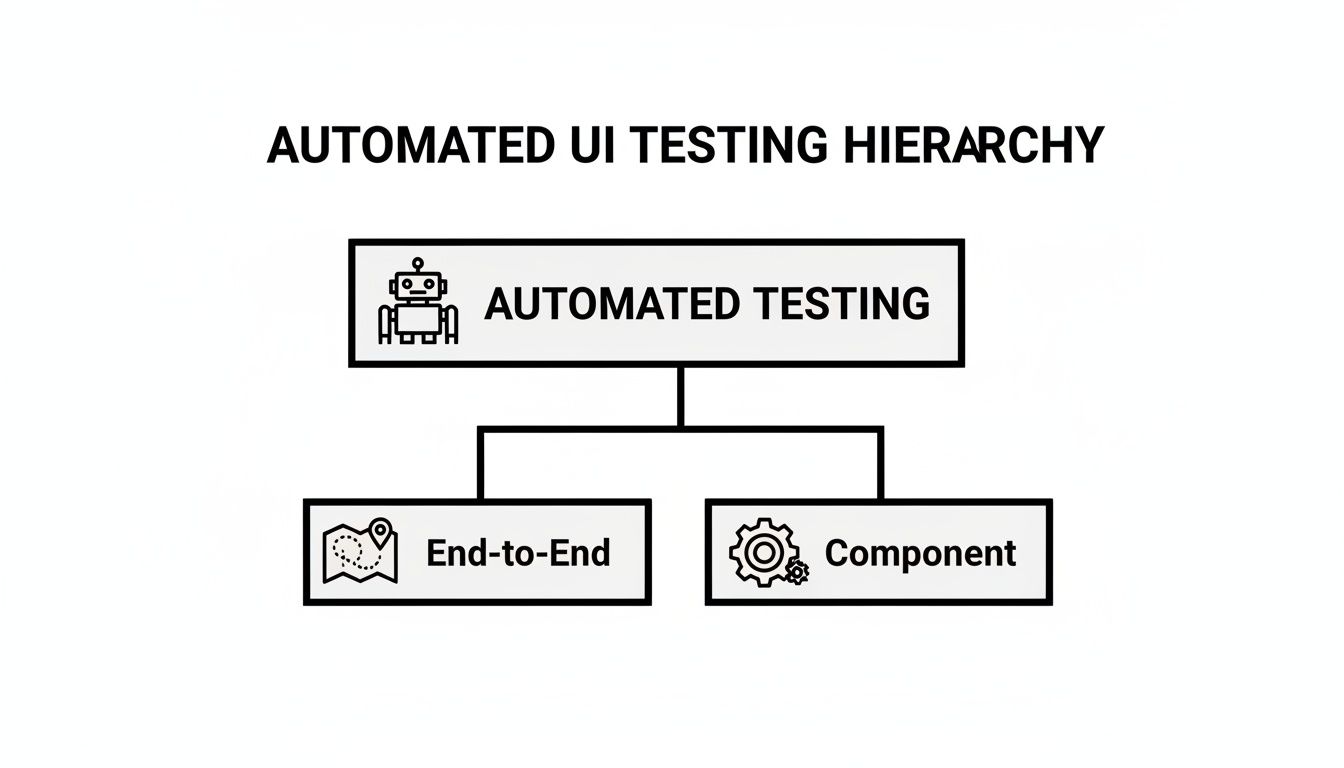
Jumping into UI automation can feel like a huge task, but a little strategy goes a long way. The most important thing to get right from the start is understanding that not all tests are built the same. You’ll mainly be working with two types: end-to-end (E2E) testing and component testing. Knowing which one to use, and when, is the secret to building a test suite that actually works.
Imagine you’re testing a new retail store. An E2E test is like shadowing a customer through their entire shopping trip. They walk in the door, grab a cart, pick items off the shelves, head to the checkout, pay, and walk out with their stuff. This single journey proves that all the separate systems—inventory, pricing, the payment terminal, the receipt printer—are all working together correctly.
A component test, on the other hand, is like pulling a single cash register off the line to test it in a workshop. Does the scanner read barcodes? Does the cash drawer pop open on command? This test is super fast, highly focused, and doesn’t care what’s happening in the rest of the store.
Both approaches have their place in a solid ui automation testing strategy, and you’ll need both to be successful.
End-to-End (E2E) tests are your heavy hitters. You’ll use them to validate the critical business flows—the multi-step journeys that absolutely have to work for your app to be useful.
Because E2E tests mimic what a real person does across the whole application, they give you the most confidence that your software is truly working. The trade-off? They’re usually slower to run and can be “brittle”—meaning a small UI change can easily break them.
A smart E2E test strategy isn’t about covering every single click and edge case. It’s about protecting the “happy paths” of your most valuable user flows. You want to be sure the core functions people rely on are always solid.
On the flip side, component tests are all about speed and precision. They focus on a single piece of the UI in total isolation—think of a date picker, a search bar, or a navigation menu. They run in a blink of an eye and aren’t affected by changes happening elsewhere, which makes them fantastic for catching bugs super early in the development process.
This need for fast, reliable feedback is exactly why automation has become so huge. The automation testing market is on track to grow from USD 28.1 billion to USD 55.2 billion by 2028, and a big part of that is teams needing to validate UI and UX changes without slowing down. You can see more on this trend and what it means for engineering teams in the full market report.
When you’re just getting started, the biggest mistake is trying to automate everything at once. Don’t. Start small and build momentum.
By nailing one important workflow first, you create a solid foundation to build on. That first win becomes a building block for a test suite that can scale without becoming a maintenance nightmare. Once you’re comfortable, you can start adding more complex scenarios and component tests. But that first, clear, high-value win is the best way to kick off your UI automation journey.
To dive deeper into structuring these tests, check out our guide on best practices for UI test automation using page transactions.
There’s nothing that kills an automation project faster than flaky tests. You know the kind—a test that passes, then fails five minutes later, even when absolutely nothing has changed in the code. This kind of unpredictability is a team’s worst enemy.
When failures are random, people stop trusting the results. Soon enough, they start ignoring them altogether, and all that hard work you put into automation goes right out the window. The real goal is to build tests that are deterministic, where a failure is a genuine, actionable signal that something is actually broken. Fighting flakiness isn’t just a chore; it’s about defending the value of your entire quality process.
Think of your testing strategy as a hierarchy. UI tests, especially the big end-to-end ones, are at the very top. They cover a lot of ground but are also the most prone to the kind of flakiness we need to stamp out.
Let’s get into the practical ways to make your tests rock-solid.
One of the biggest culprits behind flaky tests? A bad element selector. If your script can’t find the button it’s supposed to click, it’s game over. The trick is to pick selectors that are immune to routine UI tweaks from developers.
Imagine you’re giving someone directions. Telling them to find “the third blue button on the page” is a recipe for failure. But saying “find the button labeled ‘Submit Order’” is crystal clear and much more likely to work, even if the button’s color or position changes.
I’ve seen teams struggle with this for years. A solid selector strategy is a non-negotiable first step.
The stability of your test selectors can make or break your automation suite. Choosing a robust selector from the start saves countless hours of debugging down the road. Below is a quick comparison to help you pick the right tool for the job.
| Selector Type | Reliability | Best For | When to Avoid |
|---|---|---|---|
| Unique Test ID | Excellent | Elements specifically tagged for automation (e.g., data-testid). | N/A - This is the gold standard. |
| Accessibility Locator | Very Good | Finding elements by aria-label, role, or visible text. | When accessibility attributes are missing or inconsistent. |
| ID | Good | Elements with a unique, static id attribute. | When IDs are dynamically generated or not unique. |
| Class Name | Fair | Simple components, but proceed with caution. | When classes are used for styling and change frequently. |
| Full XPath | Poor | Absolutely last resort; extremely brittle. | Almost always. A small UI change will break it. |
In short, always push your development team to add dedicated test IDs like data-testid. It’s a small effort that pays huge dividends in test stability.
By the way, if your team is working with specific frameworks, following platform conventions can naturally lead to a more testable UI. For instance, these expert tips on React Native Best Practices for Flawless Apps can help create a more stable foundation for your tests.
Timing issues are the second major source of flakiness. A test fails because it tries to click an element that hasn’t loaded yet. The classic, but terrible, fix is to sprinkle sleep(5) commands everywhere, forcing the test to pause for five seconds.
This is a trap. If the app is running fast, you’ve just wasted five seconds. If it’s slow, the test will fail anyway. You end up with tests that are both slow and unreliable—the worst of both worlds.
The right way to handle this is with intelligent waits, often called “explicit waits.” Instead of pausing for a fixed time, you tell the script to wait until a certain condition is met—like “wait until this button is visible and clickable”—up to a reasonable timeout. This makes your tests faster and far more resilient to performance fluctuations.
Finally, your tests should never depend on one another. Each test needs to be its own self-contained story. It should set up the world it needs, perform its actions, and then clean up after itself. If Test B only works after Test A runs, you’ve built a house of cards that will be a nightmare to debug.
Here’s how to keep them independent:
By getting a handle on your selectors, using smart waits, and keeping your tests independent, you can build a ui automation testing suite that your team can actually trust. For a much deeper dive, check out our guide on how to overcome flaky tests and maintenance in functional test automation.
A great UI automation strategy is about more than just writing solid test code. Think of it like a play: you need a clean stage and the right props for every performance. If your tests start failing because the data is wrong or the environment is flaky, you’re left wondering—is this a real bug, or just a setup problem? That kind of uncertainty kills the trust your team has in your automation suite.
One of the most common traps is hardcoding test data. We’ve all seen it: the same testuser@example.com and password123 are used in every single script. It seems easy at first, but the moment that user’s account gets changed or deleted, a dozen tests can suddenly fail at once. A far better approach is to treat your test data as a dynamic resource you can create and tear down for each test run.
Your tests need to be repeatable and independent. The key is having a system that can provide fresh, predictable data on demand. This stops tests from stepping on each other’s toes and makes tracking down the root cause of a failure much, much easier.
Here are three battle-tested methods:
A UI test should be about one thing: testing the UI. It shouldn’t be about testing your data creation forms. Using an API to set the stage lets your test skip all the tedious setup clicks and get straight to the main event. Your tests will run faster and be way more stable.
Moving to one of these strategies gets you away from fragile, hardcoded values. Instead, each test becomes a self-contained, predictable unit. That kind of isolation is the bedrock of any maintainable ui automation testing framework.
Your test environment is just as critical as your data. It needs to be a clean, isolated, and faithful replica of your production setup. If it’s slow, bogged down with old data, or configured differently than what your users experience, your test results are basically worthless.
The goal here is to eliminate variables. When a test fails, you want to be sure it’s because of a change in the application code, not some random hiccup in the test environment. Consistency is everything if you want results you can actually trust.
Here’s what a good test environment looks like:
Getting your data and environments in order is what turns your UI tests from a fragile house of cards into a reliable quality gate. It’s what gives your team the confidence to ship code quickly and safely.
Having a solid suite of automated tests is great, but their real value shines when you weave them directly into your development workflow. This is where a CI/CD (Continuous Integration/Continuous Deployment) pipeline comes in. It takes your UI tests from an occasional, manual task to a constant, automated guardian of your application’s quality.
Instead of a developer remembering to run tests, the pipeline handles it automatically. Every time code is pushed, your tests spring into action, giving the team immediate feedback on whether the changes introduced a bug.
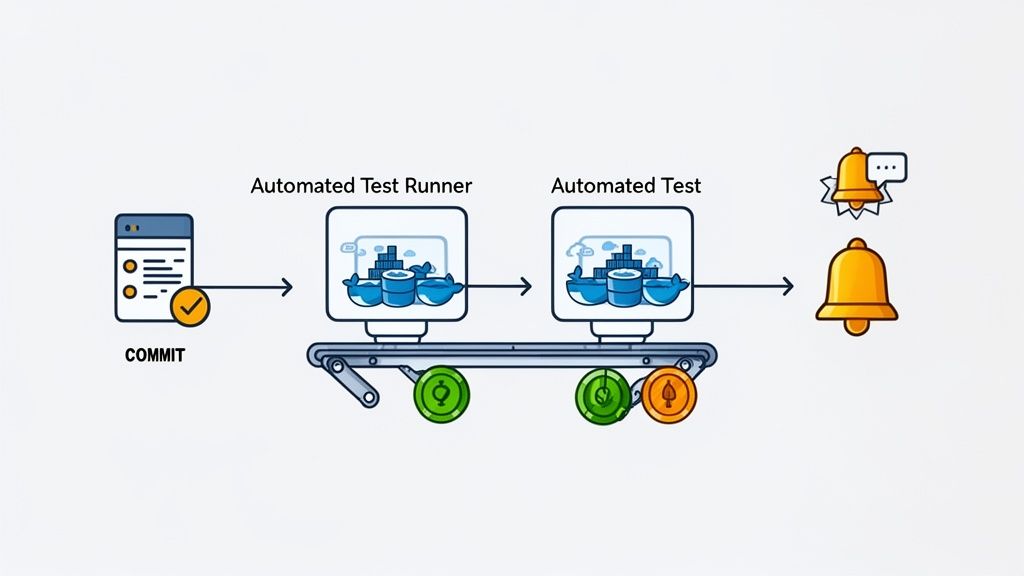
Think of your CI/CD pipeline as a factory assembly line for your software. A developer commits code, and the line starts moving. It compiles the code, runs quick checks, and then hits your UI automation suite—one of the most important quality gates. If a bug is found, the line stops, preventing a faulty product from ever reaching your users.
The first step is setting up triggers that tell your pipeline when to run the UI tests. You don’t need to run every single test on every single commit. That would be slow and inefficient.
A smarter approach is to be strategic. For example, you can run a small set of critical “smoke tests” on every commit to a feature branch. This gives developers feedback in just a few minutes. Then, you can save the full, time-consuming regression suite for bigger events, like when a pull request is ready to be merged or right before deploying to a staging server. This tiered strategy gives you the right balance of speed and thoroughness.
Getting this integration right is key. You want your pipeline to be fast, reliable, and to give your team clear, actionable information when something breaks. We cover this in-depth in our guide on the best practices for integrating testing into your CI/CD pipeline, but here are the core principles.
Integrating UI automation into your CI/CD pipeline is a classic example of “shifting quality left.” You’re catching bugs much earlier in the process, when they are exponentially cheaper and faster to fix, instead of waiting for your customers to find them in production.
This tight integration turns your test scripts into a living, breathing quality system that’s constantly on watch. It gives your entire team the confidence to ship code faster, knowing there’s a powerful safety net ready to catch any mistakes.
Traditional UI automation has always been powerful, but let’s be honest—it often requires a ton of technical expertise and a serious time commitment. This is exactly where AI is stepping in and shaking things up, shifting the focus from rigid, hand-coded scripts to intelligent systems that can actually understand what you’re trying to test.
The whole point is to make test creation faster and more accessible. Instead of a QA engineer spending hours writing code for every click, input, and check, newer tools use AI agents. You can give these agents a simple command in plain English, like “test the guest checkout flow from start to finish,” and it will generate the complete test script for you.
AI isn’t just a shortcut for writing tests; it also makes them smarter and more robust. One of the biggest game-changers is the idea of self-healing locators.
We’ve all been there: a developer changes a button’s ID, and suddenly, your carefully crafted test fails. It’s a constant, frustrating maintenance cycle. An AI-powered tool, however, is smart enough to look at other attributes—like the button’s text, position, or surrounding elements—and figure out that the element just moved or was updated, not removed. It then automatically corrects the selector on the fly, saving your team countless hours.
AI also brings a new level of intelligence to visual regression testing. It can use machine learning to tell the difference between a real visual bug and a minor, acceptable rendering change (like a single-pixel shift), which drastically cuts down on the noise from false positives.
AI’s role in testing is not to replace skilled QA professionals but to act as a powerful co-pilot. It automates repetitive, time-consuming tasks, freeing up your team to focus on high-value exploratory testing, complex edge cases, and strategic quality initiatives.
This isn’t just a niche trend; it’s a massive shift. The AI testing market is on track to hit USD 26.8 billion by 2033, a clear signal that the industry is hungry for tools that can keep up with today’s fast-paced development cycles.
To get a feel for how AI is being used across different industries, reading up on AI in business automation can give you some great context. Ultimately, these advancements let teams hand off the grunt work of test creation and maintenance to a machine, allowing them to focus on the human side of quality assurance.
Even with a solid plan, you’re bound to run into questions when you start putting UI automation into practice. Let’s tackle some of the most common ones that pop up.
The dream of 100% automation is tempting, but it’s usually a trap. Chasing that number often leads to brittle, high-maintenance tests that don’t provide a great return on your time.
A much smarter approach is to think in terms of the “Testing Pyramid.” The bulk of your automation efforts should be at the bottom—on fast, stable unit and integration tests. For UI automation, you want to be selective. Focus on the most critical user journeys, the “happy paths” that absolutely must work, and key regression checks.
Remember, a scripted test will never tell you if a new button feels “weird” or a color scheme is off-putting. That’s where manual and exploratory testing still shine, catching the kinds of things an automated script would blissfully ignore.
Absolutely not. Think of UI automation as a powerful assistant for your manual testers, not a replacement. Its real strength is in handling the tedious, repetitive regression tests that burn out human testers. It can run the same checks over and over with perfect precision, day or night.
This frees up your QA team to do what humans do best: think critically. They can now focus their energy on creative exploratory testing, digging into complex user scenarios, and providing real feedback on usability and the overall user experience. The best QA strategies don’t choose between automation and people; they blend the machine’s tireless speed with the human’s insightful curiosity.
This is a great question because it gets to the heart of how test creation is evolving.
Selenium is the classic, foundational framework for browser automation. It’s like being given a box of powerful engine parts—you can build almost anything, but you need to be a skilled mechanic. With Selenium, you write code to tell the browser exactly what to do, step-by-step: “find this element with this specific ID, then click it, then wait for this other element to appear.” It’s incredibly powerful but demands significant coding skills to build and maintain.
AI-driven tools work at a much higher level. Instead of handing you the engine parts, they give you a steering wheel. You simply state your intent, like “Test the entire user login flow,” and an AI agent figures out the steps, generates the code, and runs the test. This massively lowers the barrier to entry and dramatically cuts down the time spent writing and fixing test scripts.
Ready to see how an AI agent can build your test suite in minutes? TestDriver lets you generate end-to-end tests from a simple prompt, freeing up your team to focus on what matters most. Start building smarter tests today.
Discover how automated functional tests can transform your QA process. Learn core concepts, best practices, and how AI is making test creation faster than ever.
Master UI test automation with this practical guide. Learn to choose frameworks, write reliable tests, integrate CI/CD, and leverage AI for faster releases.
Discover the top 12 no code test automation tools for 2025. Compare features, pros, cons, and pricing to find the perfect solution for your QA needs.
Discover the 12 best codeless automation testing tools for web, API, and mobile. Our 2026 guide helps you choose the right platform for your QA workflow.
TestDriver runs every pull request in a real desktop sandbox, finds bugs, and builds regression tests - right from your repo.